
Structured Workflows
Run a validated, step-by-step analysis that pauses for your decisions at the steps that matter.
A structured workflow is a pre-built analysis for a common task, such as scRNA-seq QC and clustering, flow cytometry gating or bacterial genome assembly. It runs the same validated steps every time and pauses at subjective steps (for example QC cutoffs or clustering resolution) so you make the scientific decisions with live evidence in front of you.
When to use a workflow
| Use a structured workflow when... | Use a normal prompt when... |
|---|---|
| The task is a standard analysis with known best practices | The question is new or exploratory |
| You want the same steps every time, for example across samples or projects | You want Drylab to choose the methods |
| Key choices (cutoffs, resolution, labels) should be yours | You only need a quick answer, a plot or a test |
| You need to report how each step was done | The analysis is a one-off |
What you get with a workflow:
- Validated steps. Each step follows Drylab's tested protocol for that data type, including the checks experts usually do by hand.
- Your decisions, with evidence. At subjective steps Drylab stops and shows the plots, tables or numbers you need, with its recommendation already selected.
- Reproducible results. The steps, the values you chose and the code all end up in the notebook.
Available workflows
| Workflow | For | Steps | Decisions you make |
|---|---|---|---|
| scRNA QC + Clustering | Raw single-cell RNA-seq | 6 | QC cutoffs with live cell retention, doublet removal, clustering resolution (pick a UMAP) |
| scRNA Cell-Type Annotation | A clustered single-cell object | 5 | Clustering resolution (pick a UMAP), per-cluster cell-type labels, whether to subcluster mixed clusters |
| Spatial Domain Detection & Annotation | Visium, Visium HD or Xenium slides | 6 | Tissue filters, spatial-domain method and granularity, reference mapping, domain labels |
| Flow Cytometry Analysis | Raw FCS files | 8 | Experiment map, panel map, gates |
| Microscopy Segmentation | Microscopy images | 5 | Segmentation method, mask corrections (click or draw on the image), object-size filter |
| Small-Molecule Docking & Hit Triage | A protein target and a compound library | 6 | Binding pocket, docking-score cutoff, pose triage, property liabilities |
| Bacterial WGS | Bacterial isolate reads | 11 | Study scope, assembler, assembly QC, species and typing, resistance screening, sign-off |
| Fungal Genome | Fungal isolate reads | 11 | Study scope, assembler, assembly QC, species identification, sign-off |
| Viral Genome | Viral sample reads | 11 | Study scope, assembly mode, coverage QC, virus and lineage, sign-off |
| Shotgun Microbiome | Shotgun metagenomes or abundance tables | 17 | Study scope, input route, depth cutoff, diversity and abundance methods, optional add-ons, sign-off |
Find a workflow
Type @w in the chatbox, followed by a keyword, to list matching workflows. Each entry shows how many steps it has.
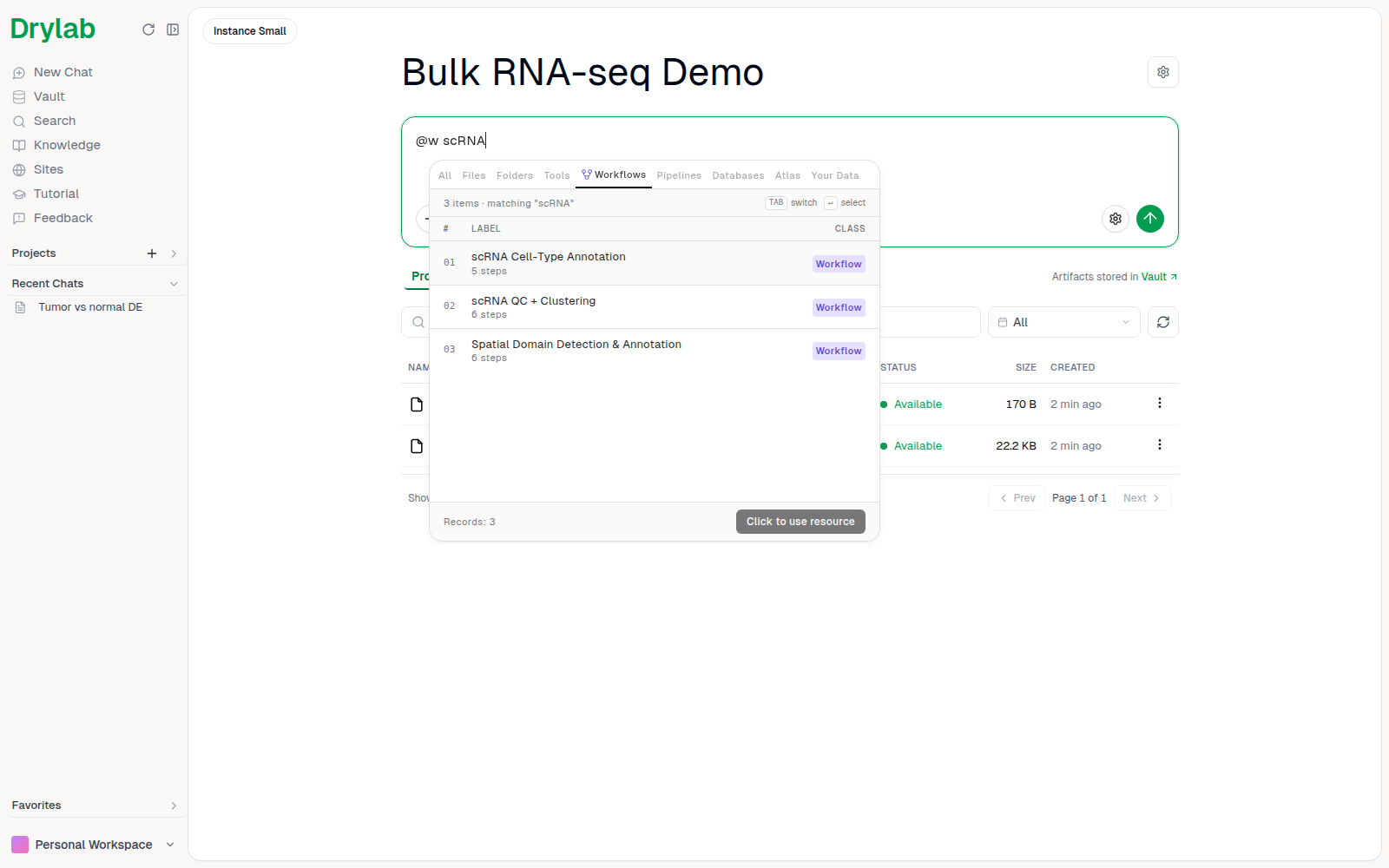
You can also open the Workflows tab in the @ picker. See Mention Files and Resources.
Preview the steps
Hover a workflow to see its Decision Flow, the numbered Steps & Artifacts, its Documentation and the Skills Used.
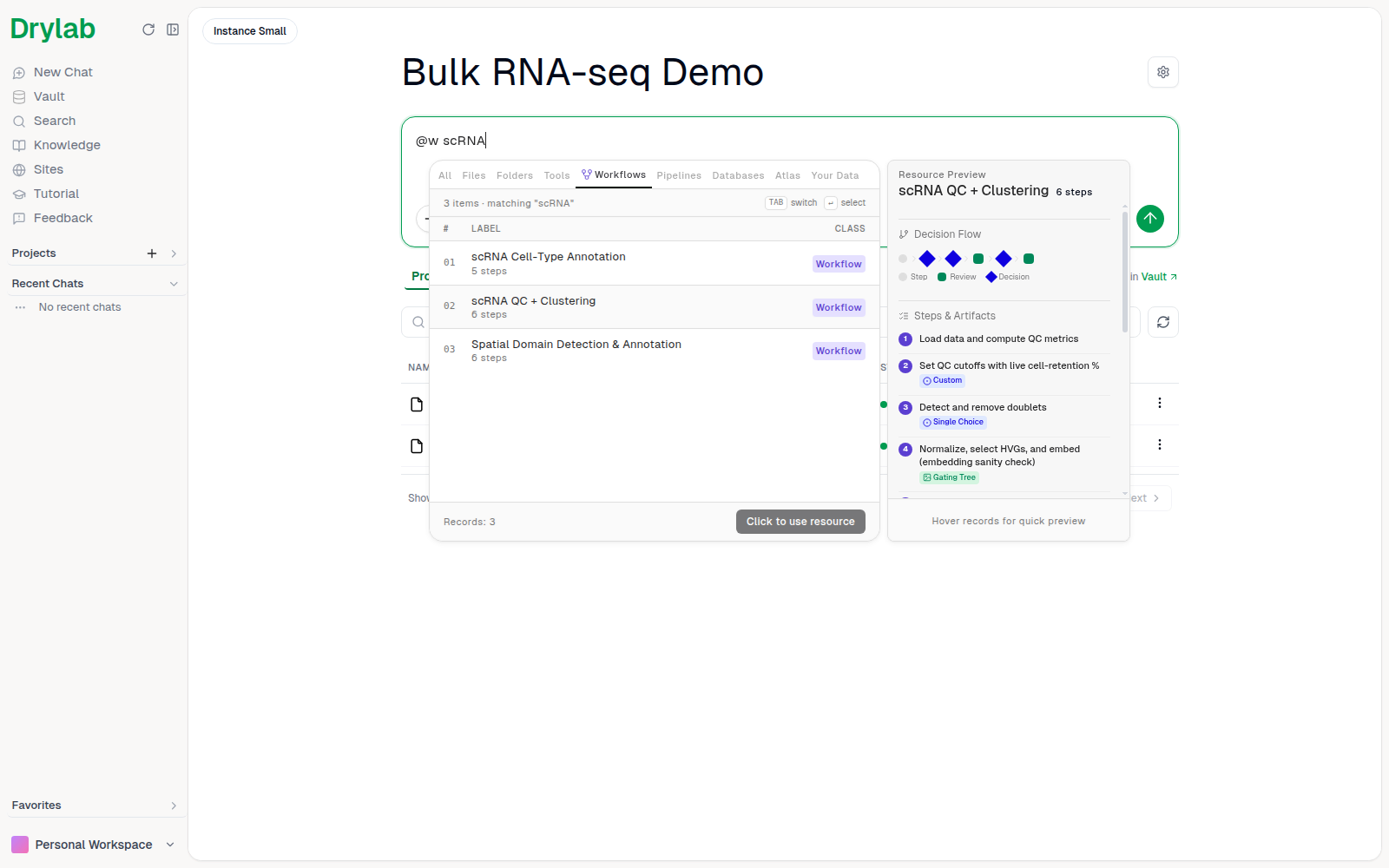
The legend shows three kinds of steps:
- Step: runs on its own.
- Review: shows a result, such as a table or plot, for you to check in the step review card.
- Decision: pauses mid-step for your choice.
The tag next to each step names the interactive view you will see:
| Tag | You will... |
|---|---|
| Single Choice / Multi Choice | Pick one or several options |
| Image Choice | Pick from candidate plots, for example UMAPs at different resolutions |
| Threshold / Range | Set a cutoff or a range, with a live preview of its effect |
| Parameter Form | Fill in parameters |
| Table Edit | Review and correct a generated table, for example cell-type labels |
| Gating Tree / Interactive Gating / Gating | Review or adjust flow cytometry gates |
| Compensation Matrix / Positive % / MFI Table | Review flow cytometry compensation and marker positivity |
| Image Annotate | Click points or boxes on a microscopy image |
| Embedding Scatter / Spatial Viewer / 3D Molecule | Explore an interactive UMAP, tissue map or protein structure |
| Custom | Use a purpose-built interactive view |
How to answer each of these is explained in Plans and Questions.
Run a workflow
- Select the workflow from the picker, then mention your data and add any details (organism, metadata columns, thresholds you already know).
- Send the message, review the plan, and approve it.
- When a step needs your choice (a Decision tag), Drylab pauses with a Decision needed card: check the evidence, adjust the choice, and click Continue.
- Depending on Step review, Drylab may also pause after steps to show Review results. Click Approve & continue, or Request changes.
- At the end, Drylab summarizes the results in the chat and saves every step, with the values you chose, in the notebook.
Example messages:
@scRNA QC + Clustering on @pbmc_10k.h5 (human, mitochondrial genes start with MT-)@Flow Cytometry Analysis on the FCS files in @fcs_run_01; controls are the FMO files@Microscopy Segmentation on @nuclei_dapi.tif, segment the nuclei
See Plans and Questions for every card a workflow can pause with, including picking the best image and marking an image.
For a full example, see The scRNA-seq Workflow in Drylab.
Automatic workflow detection
If you don't mention a workflow but your request matches one, Drylab shows Structured workflow detected and asks how to proceed: click Interactive to run the workflow, or No workflow to continue without it. Tick Remember my choice for future sessions to stop asking.
You can change the default in Settings > General > Structured workflows ("When no workflow is mentioned, how should we handle a detected match?"):
| Option | Behavior |
|---|---|
| Ask me | Ask each time a relevant workflow is detected. |
| Interactive | Apply detected workflows automatically, with review on subjective steps. |
| Automated | Apply detected workflows automatically and run them fully automated. |
| Off | Never detect or suggest structured workflows. |
Tips
- Mention the data in the same message as the workflow, so Drylab can start straight away.
- Give what you already know (organism, controls, expected cell types). Drylab takes it into account when it recommends choices.
- Take your time at decisions. Drylab waits at each card, so you can open the plots full size before choosing.
- Changed your mind after a step? Type in the chatbox to steer, or use Request changes on the step review card.