
Plans & Billing
See your current plan, compare plans, and upgrade for more tokens, storage, accelerated tools and team features.
Open Settings > Plans & Billing (or Plans in the profile menu).
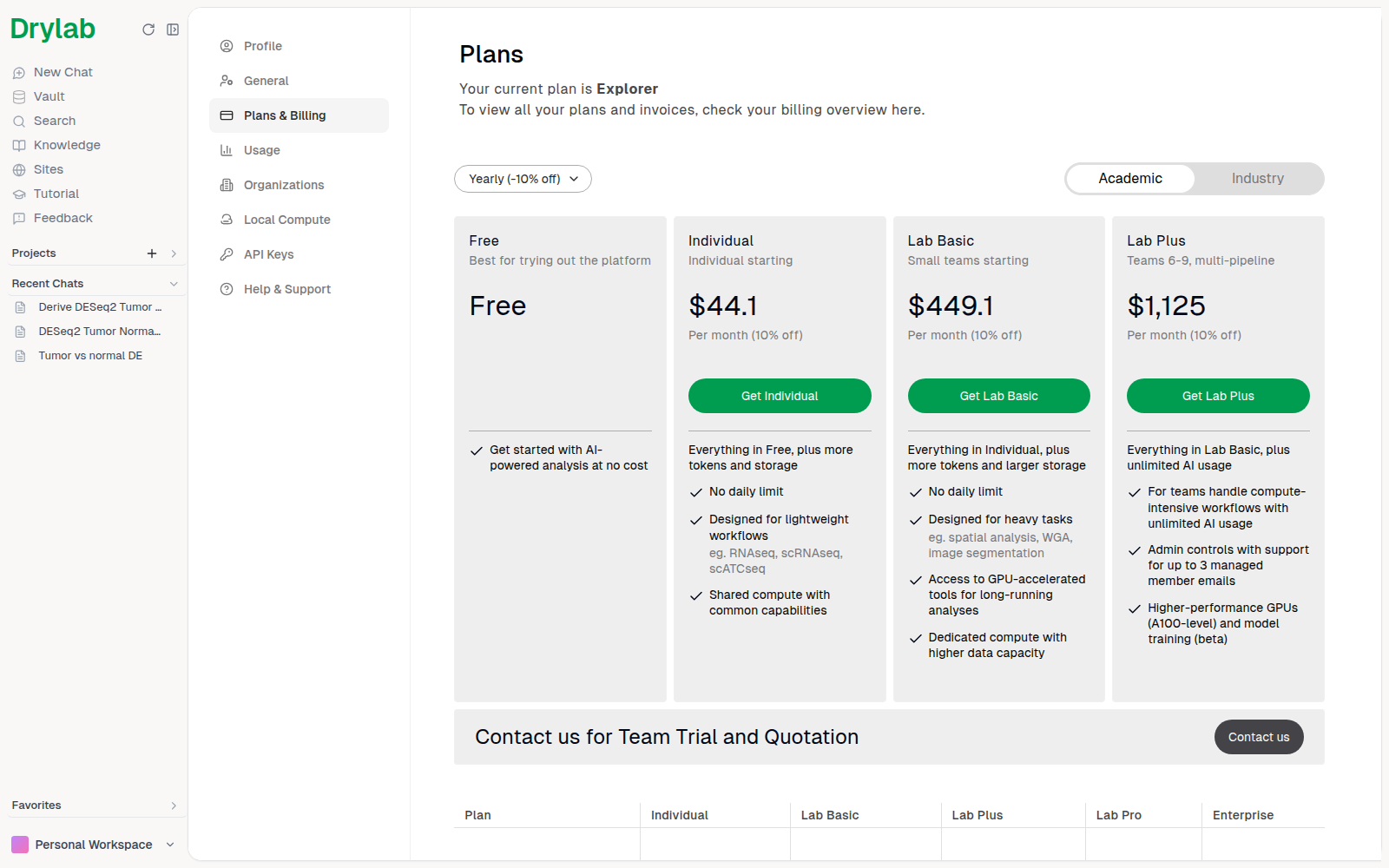
At the top you'll see your current plan and when it renews or ends, with a link to your billing overview for plans and invoices (paid plans). Trial plans such as Explorer don't have a card.
Choose a plan
- Choose Monthly or Yearly (-10% off) billing.
- Choose Academic (Free, Individual, Lab Basic, Lab Plus) or Industry (Lab Pro, Enterprise) plans.
- Each card summarizes the plan. Click Get ... to upgrade, or Contact us for team trials, quotes and Enterprise.
| Plan | Designed for |
|---|---|
| Free | Trying out the platform |
| Individual | Individual researchers with lightweight workflows (for example RNA-seq, scRNA-seq) |
| Lab Basic | Small teams with heavier work (for example spatial analysis, WGA, image segmentation), including GPU-accelerated tools |
| Lab Plus | Small teams running several pipelines, with unlimited AI usage and an organization of up to 3 members |
| Lab Pro | Data-heavy teams of 10+ and industry applications |
| Enterprise | Institutes and large organizations |
For current prices and exact limits, see the plan cards in the app or thedrylab.com/pricing.
What each plan includes
| Feature | Free, Individual | Lab Basic | Lab Plus, Lab Pro, Enterprise |
|---|---|---|---|
| Accelerated tools | No | Yes | Yes |
| Desktop App | No | Yes | Yes |
| Local Runtime | No | Yes | Yes |
| Sites (publish, share and open apps) | Gallery apps only | Yes | Yes |
| Organizations and Portal Apps | No | No | Yes (Lab Plus 3 seats, Lab Pro 6) |
When a feature isn't included, Drylab says so where you'd use it and offers Upgrade plan.
Messages per conversation
From November 2, 2026, one conversation can hold up to 150 messages on Free and Individual, and up to 750 on Lab Basic. When a conversation reaches the limit, start a new one; your message is carried over. See Stay Focused in Long Analyses.
Compare plans
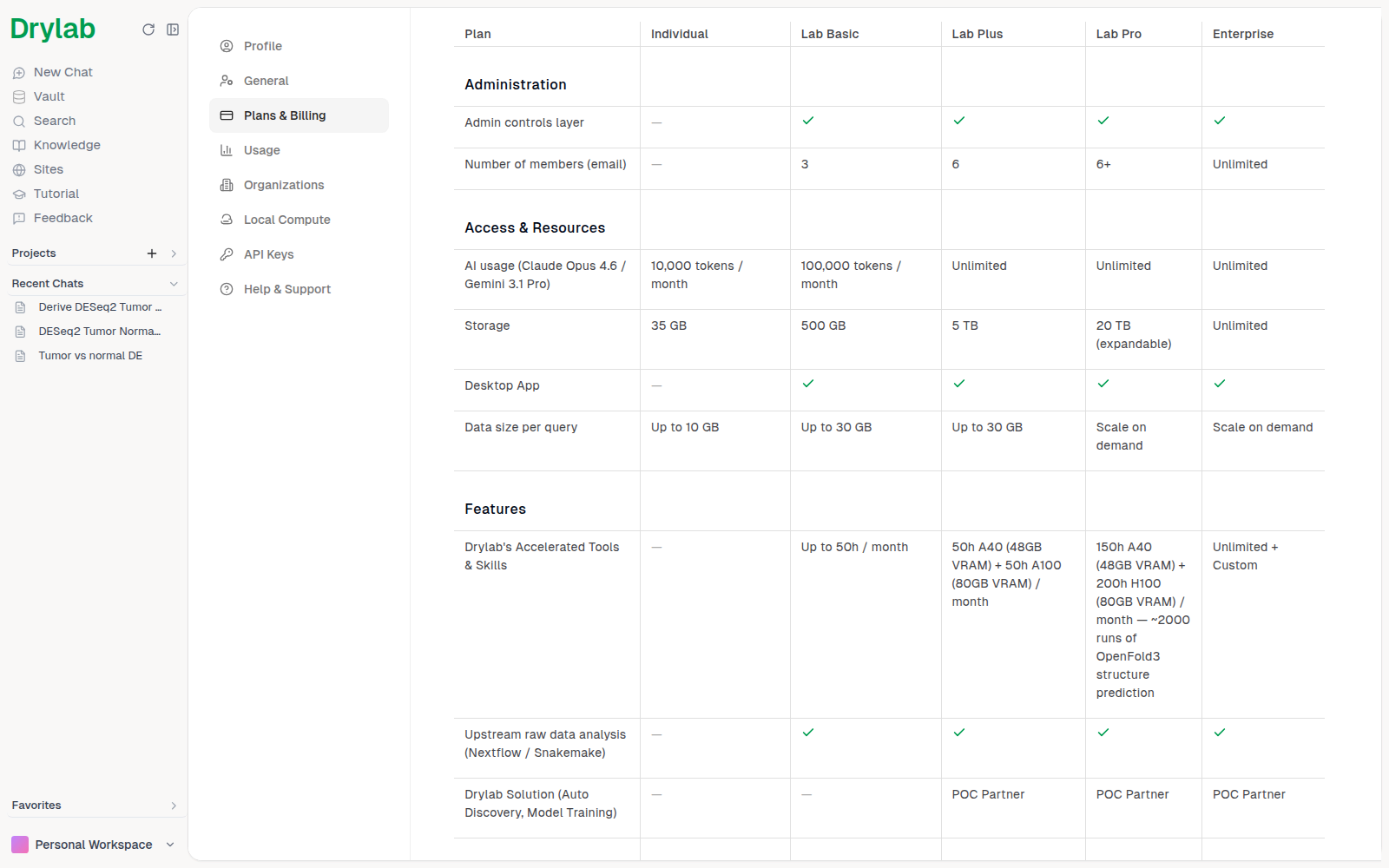
Scroll down for the full comparison table (paid plans). It includes, among others:
- Administration: admin controls and the number of member emails.
- Access & Resources: monthly AI usage, storage, Desktop App access and the maximum data size per analysis.
- Features: hours of Drylab's accelerated tools, upstream raw-data pipelines (Nextflow / Snakemake) and Drylab Solutions.
- Compute: cloud compute priority and GPU access.
- Onboard Customization, Security and Customer Support.
Usage on your plan
Your plan sets your monthly token allowance and your storage. Track both under Settings > Usage. See Usage & Consumption.
You can also earn bonus credits (shown as Extra Tokens under Usage) by completing your profile during sign-up or inviting colleagues with Refer & Earn. See Create an Account and Invite colleagues.
Manage or cancel
On a paid plan, the Payment section's Manage in Stripe link lets you update payment details and download invoices. Cancel subscription keeps your access until the end of the current period, then moves you to Free.