
Accelerated Tools
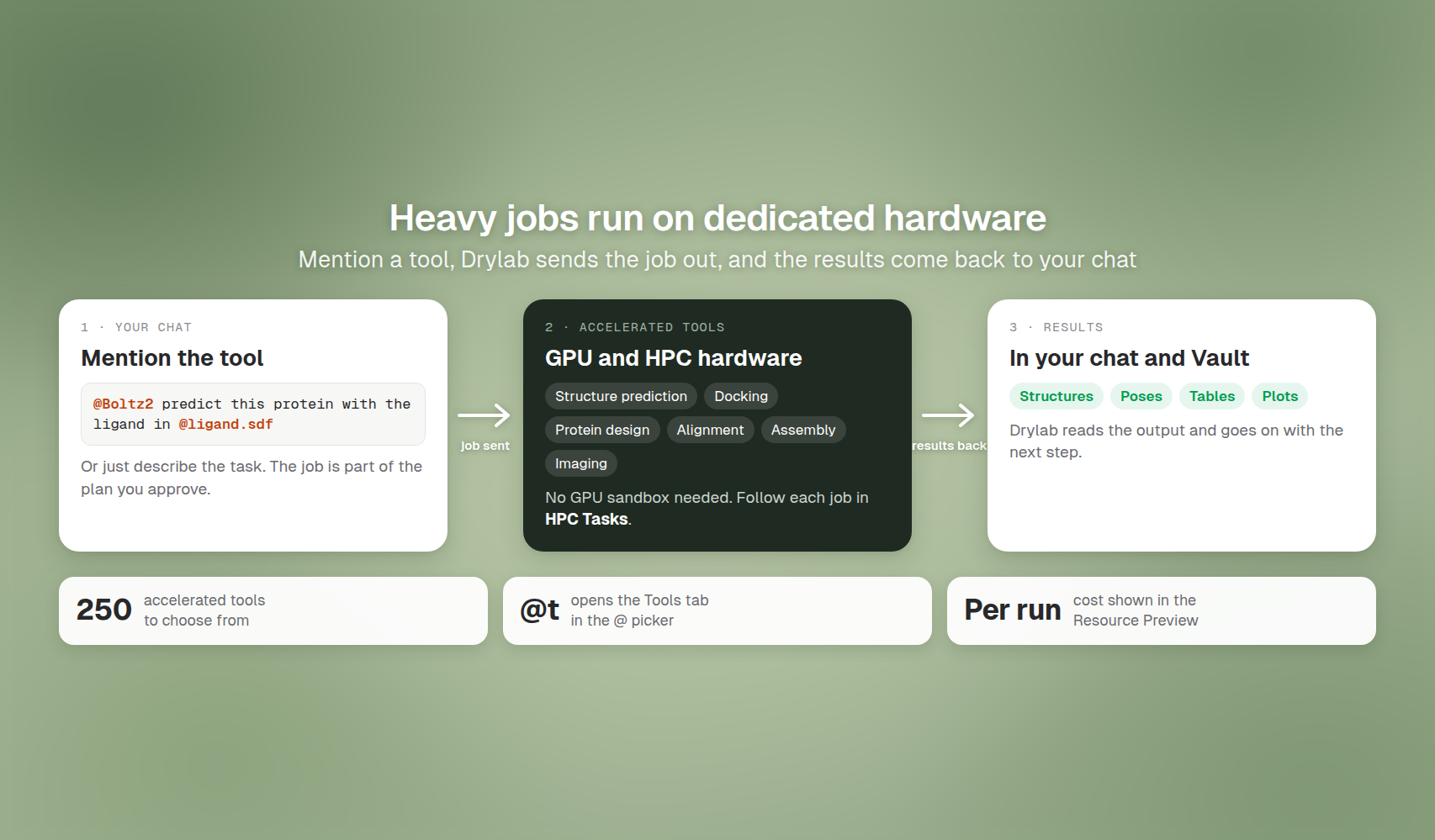
Run heavy jobs such as structure prediction, docking and alignment on dedicated GPU and HPC hardware, straight from a chat.
Some analyses need far more compute than a normal machine has: predicting a protein structure, docking thousands of molecules, aligning billions of reads. Accelerated tools run those jobs on dedicated GPU and HPC hardware, then bring the results back to your chat. You don't set up a GPU, install anything, or leave the conversation.
Why use them
- Speed. Structure prediction, docking and other heavy jobs run much faster on dedicated GPUs than on a laptop or a normal sandbox.
- No setup. Each tool is installed, configured and maintained for you, with the right GPU or CPU size.
- No GPU sandbox needed. The job runs on separate hardware, so your sandbox isn't tied up by it.
- Pay per run. Each tool shows its price before you use it, typically 0.1 credits per run.
What you can run
Drylab has about 250 accelerated tools, and about 110 of them run on GPUs. Examples:
| Category | Examples |
|---|---|
| Protein structure prediction | Boltz2, Chai-1, ESMFold, OpenFold3 |
| Protein and antibody design | RFdiffusion3, BindCraft, ProteinMPNN, ProteusAI, ABodyBuilder3, AntiFold |
| Docking and drug discovery | DiffDock, AutoDock Vina, AF2BIND |
| Molecular dynamics | GROMACS, OpenMM |
| Protein interactions | SpatialPPIv2 |
| Alignment and quantification | STAR, HISAT2, Bowtie2, Kallisto, Salmon |
| Genome assembly | Flye, Hifiasm, SPAdes, Unicycler |
| Variant calling | Clair3, PEPPER-Margin-DeepVariant, BCFtools |
| Single-cell | rapids_singlecell, scvi-tools, CellBender |
| Imaging | CellposeSAM |
| Regulatory genomics | AlphaGenome |
| QC and reporting | MultiQC |
To browse them all, type @t in the chatbox. See Mention Files and Resources.
Run an accelerated tool
-
In the chatbox, type
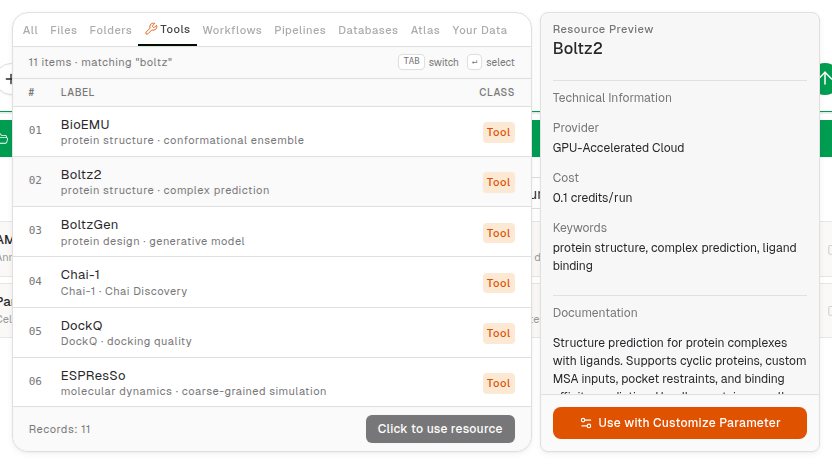
@tfollowed by a keyword, for example@t boltz. -
Hover a tool to see its Resource Preview: what it does, where it runs (GPU-Accelerated Cloud or CPU-Accelerated Cloud) and its cost (for example "0.1 credits/run").
-
Click the tool to add it to your message, then describe what you want and mention your inputs:
"@Boltz2 predict the complex of this protein with the ligand in @ligand.sdf."
-
Send the message. Drylab includes the tool in its plan, so you see which tool will run before you click Approve Plan (unless Auto-approve plan is on).
You don't have to mention a tool. If you describe the task ("predict the structure of this protein"), Drylab picks a suitable tool itself. Mention one when you want a specific tool.
The preview also offers Use with Customize Parameter, which adds the tool with a form so you can set its options before you send.
Heavy steps run on GPU automatically
For single-cell, spatial transcriptomics, ATAC and multi-omics analyses, you don't need to mention a tool at all. Drylab sends eligible heavy steps (such as doublet detection, normalization and embedding of a large dataset) to GPU workers that scale with the job. Light steps and small datasets stay in your sandbox.
- Start a chat and attach a single-cell, spatial or ATAC dataset, or mention one with
@(from your Vault or Drylab Atlas). - Describe the analysis, for example "cluster this atlas and show a UMAP" or "find spatial domains".
- Review and approve the plan. Drylab decides step by step where each step runs. There's nothing to set up.
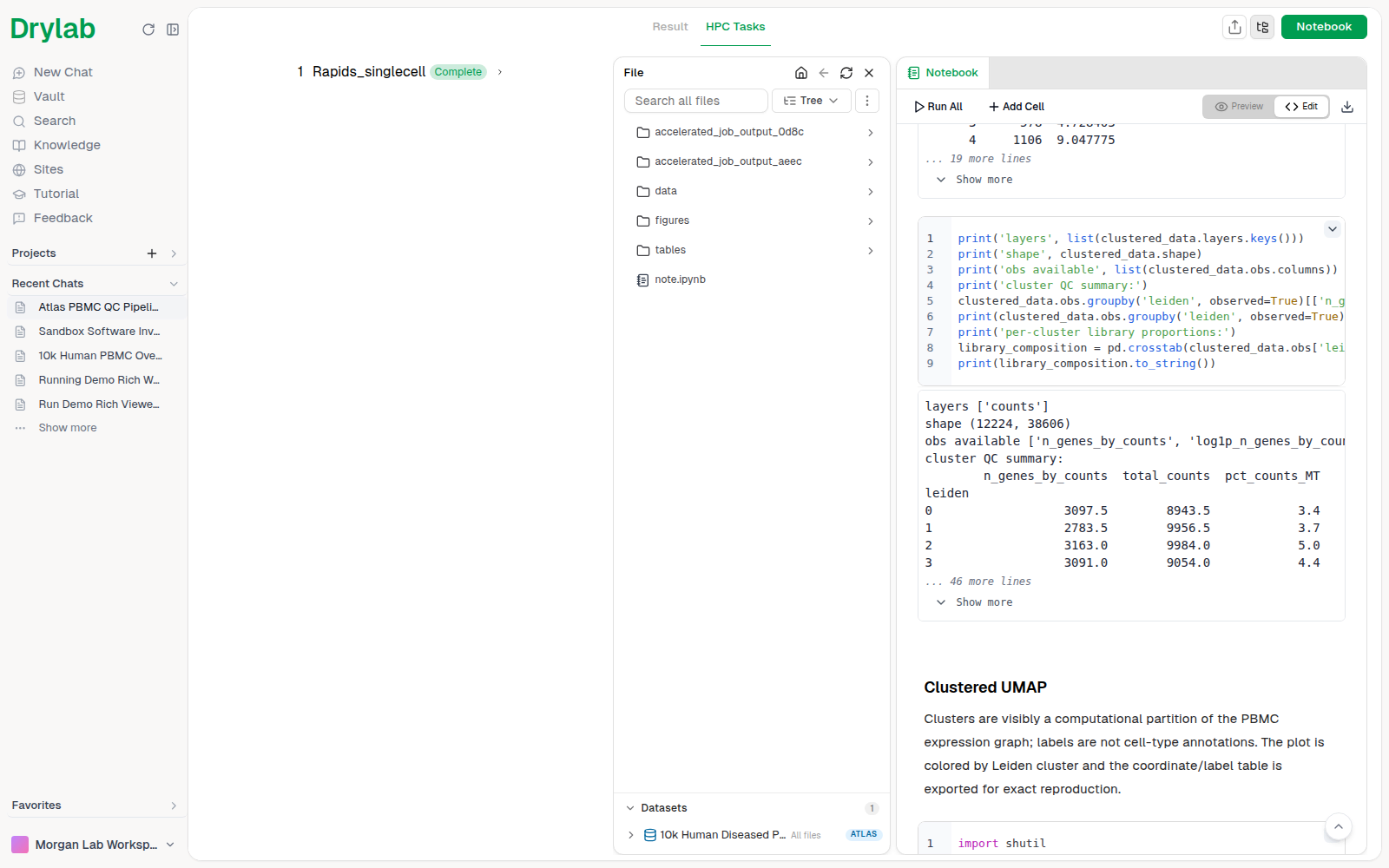
The GPU work appears in HPC Tasks as a job (for example Rapids_singlecell, Complete); several steps can share one job. Figures, tables and files come back to the same chat. If an accelerated step can't run, Drylab tells you instead of quietly switching to another method.
Follow the job
While a tool runs, click HPC Tasks in the chat's top bar to see Compute Jobs: each job's status (Queued, Running, Complete, Failed), how long it took, its cost and GPU usage, and its Log and Output Files. See HPC Tasks.
When the job finishes, Drylab reads the results, adds them to the chat and saves the outputs in your Vault, then continues with the next step of the plan.
Best practices
- Mention the tool and the inputs together. "@Boltz2 … @ligand.sdf" is clearer than describing both in words.
- Check the plan. The plan shows each tool step before anything runs; edit it if you want a different tool.
- Start small. Try one protein or a handful of molecules first, check the result, then scale up.
- Keep the sandbox small. Accelerated tools bring their own hardware, so Instance Small is usually enough. See Select a Sandbox.
- Not sure which tool? Ask: "Which accelerated tool should I use to dock 500 molecules against this pocket?"
Access and cost
- Accelerated tools are included in the Lab Basic, Lab Plus, Lab Pro and Enterprise plans. On other plans, Drylab tells you which plans include them.
- Each tool shows its cost per run in the Resource Preview. See Usage & Consumption.